Knowledge base
1000 FAQs, 500 tutorials and instructional videos. Here, there are only solutions!
Create a "catch-all" email address
This guide explains how to create a "catchall" email address on a Mail Service.
✘ UNAVAILABLE with
kSuite Free
my kSuite / my kSuite+ (ik.me, etik.com, ikmail.com)
Mail Service Starter
Introduction
- A "catchall" email address collects all emails sent to email addresses that do not exist on the domain.
- This is ideal if you want to receive all messages for which no specific address exists on your domain.
- This type of address cannot be used to send emails.
- If you configure the “Auto-reply” (out-of-office message) function on a catchall@ address, no auto-reply will be sent to senders who contacted a non-existent address on your domain.
- This restriction prevents reply loops and the sending of unwanted messages.
- Also, please read the important recommendations at the end of this guide.
Create a catch-all address
Prerequisites
- Have a Mail service on your Infomaniak Manager.
- Have a available address quota or adjust it beforehand if necessary.
Next, the administrator of a Mail Service creates a new generic email address:
- Click here to access the management of your product on the Infomaniak Manager (need help?).
- Click directly on the name assigned to the product in question.
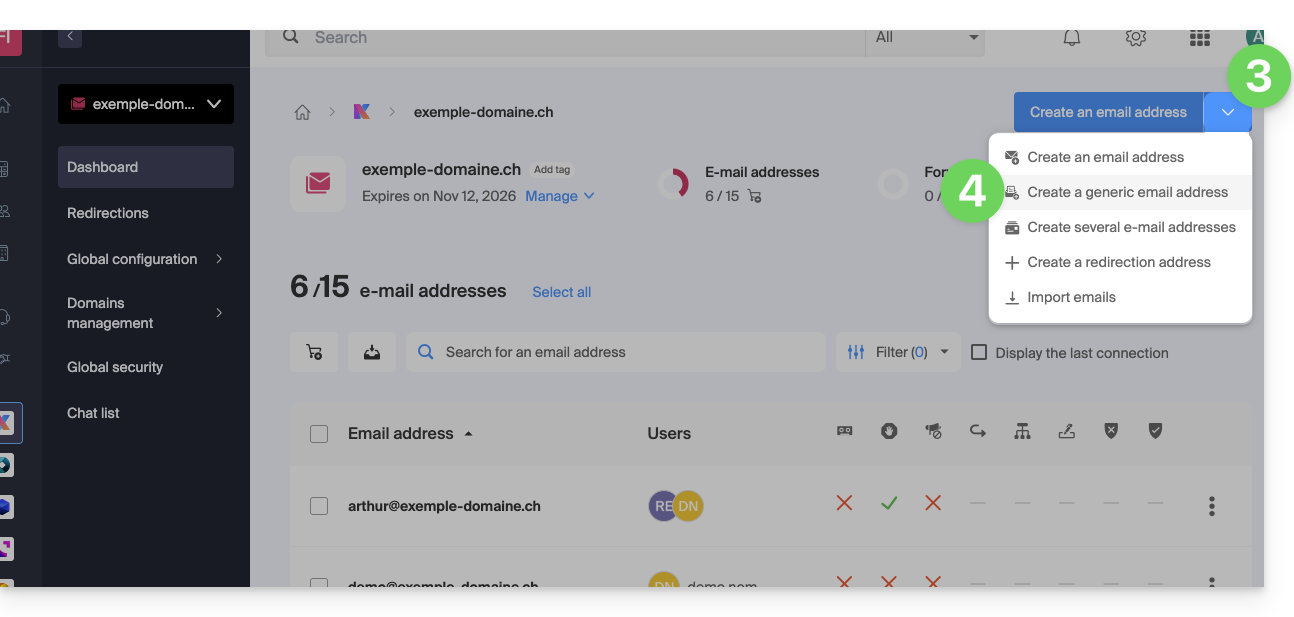
- Click on the chevron to the right of the blue Create a mail address button.
- Click on Create a generic email address:
- Choose Catchall.
- Click on Continue:
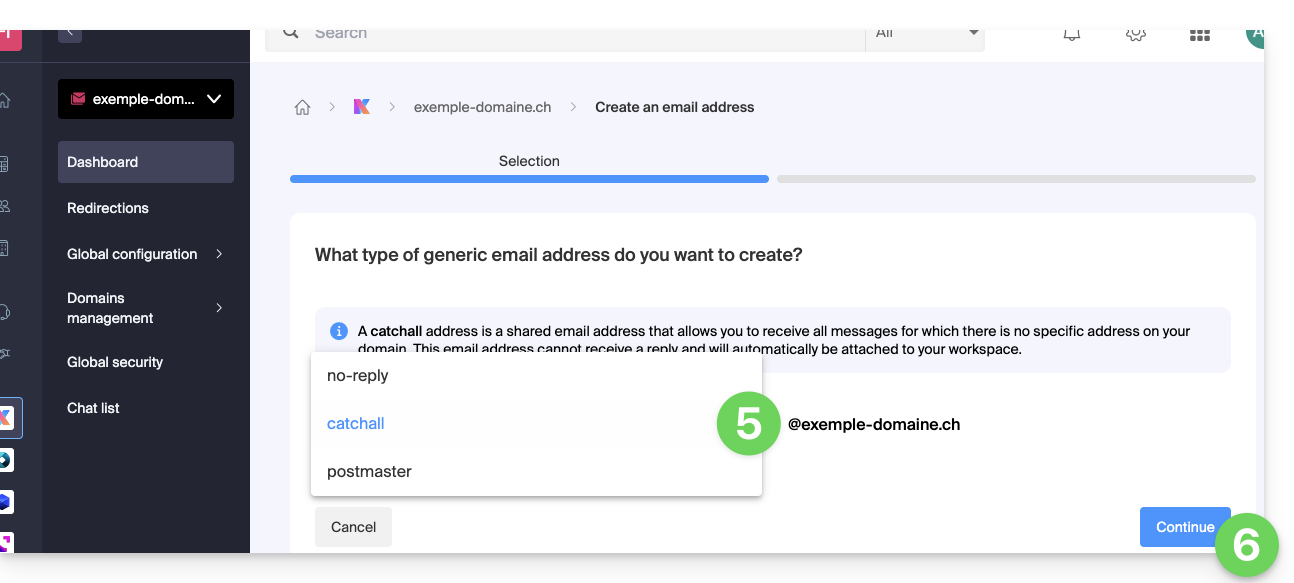
Once the catchall address is created, it will be automatically visible in your Infomaniak Mail web app.
To use it elsewhere, you need to add a password for your devices/users.
Example of use
Once the catchall address has been created:
- You use the email address
jonnie.smith@domain.xyz, which works and exists on thedomain.xyzMail Service.- You have also created an address
catchall@domain.xyzon thedomain.xyzMail Service.
- You have also created an address
- An email is sent to
smith.johnny@domain.xyzbecause the sender misspelled the recipient's address.. - The email will still arrive in the
catchall@domain.xyzinbox, which you can simply check in your preferred Mail interface. - The same applies if you delete the
jonnie.smith@domain.xyzaddress at some point; if you keep thecatchalladdress, then it will receive all emails still addressed to the non-existent address...
Important recommendations
Creating this type of account is not recommended:
- Catch-all addresses receive all emails sent to any domain address; this means they are often flooded with spam, which can be difficult to manage and filter.
- Due to the high volume of spam, legitimate messages can be lost and buried in the mass, which can lead to the loss of important communications.
- Catchall addresses can potentially be used by attackers to target your domain with brute-force attacks or other methods, as they offer an easy target for testing different address combinations.
In short, managing a catchall address can become tedious and complicated, especially for large organizations with many employees and departments.
Link to this FAQ: https://faq.infomaniak.com/126
Has this FAQ been helpful?